

msascope: large alignment viewer
msascope is a desktop viewer for multiple sequence alignments that stays smooth at sizes where the
usual viewers give up. 100,000 sequences × 30,000 columns loads in about 5 seconds into 1.6 GB of
RAM. The whole alignment then pans at the display’s 60 frames per second, from the full overview
down to individual letters.
It was called msaview up to irit 0.2.1. It was renamed because MSAView is the long-standing name of
GMOD’s web viewer (now JBrowseMSA, npm package react-msaview).
Jalview and AliView (Java) and SeaView show a few hundred rows comfortably, fail silently when they
run out of memory, and stall somewhere between 10^4 and 10^5 sequences. Surveillance alignments
(SARS-CoV-2, influenza, mpox) are now 10^5–10^6 genomes of ~30 kb. No native desktop viewer handles
that size; a WebGL viewer (Alignment Viewer 2.0) reported 10–100× gains from drawing on the GPU, so
msascope draws with GPUI, Zed’s GPU-accelerated UI framework. See
landscape.
msascope alignment.fasta # or .fa.gz, .aln (Clustal), .sto (Stockholm)msascope # then Open… (Ctrl+O)msascope alignment.fasta --stats # load, print sizes and timings, exit (no window)msascope silk.fasta --type protein # residue type given instead of guessed: dna, rna or proteinmsascope PF00042.sto --tree PF00042.nwk # rows in the order of a Newick treemsascope big.fa --stats --tree big.nwk # also time reading, matching and ordering the treemsascope big.fa --stats --motif 'C-x(2,4)-C' # also time a motif search over every rowmsascope big.fa --stats --sort identity # also time row figures, a sort and a filter--type also applies to files opened later with Open…. Open… (and dropping files on the
window) takes alignments and trees: a tree is matched to the open alignment, and an alignment
and a tree dropped together are opened as a pair.
On macOS, Finder’s Open With ▸ msascope (and dropping files on its Dock icon) opens alignments
(.fa, .fasta, .fas, .fna, .faa, .afa, .mfa, .aln, .clustal, .sto, .stk,
.stockholm, .gz) and trees (.nwk, .newick, .tree, .treefile). msascope registers as an
alternative app for these, never as the default one.
Menu bar and window
Section titled “Menu bar and window”| Menu | Items (shortcuts: ⌘ on macOS, Ctrl elsewhere) |
|---|---|
| msascope | About msascope, Acknowledgements, Hide (⌘H) / Hide Others / Show All (macOS), Quit (Ctrl+Q) |
| File | Open… (Ctrl+O), Open Sample Alignment, Export… (Ctrl+E), Close File, Close Window (Ctrl+W) |
| Edit | Copy Selection (Ctrl+C), Select All (Ctrl+A) |
| Help | msascope Help (this page), Acknowledgements |
On macOS, closing the window keeps msascope running, as Mac apps do; clicking its Dock icon opens
a new window. On Linux and Windows, closing the last window quits. Acknowledgements opens the
licences of the open-source code msascope is built from (Acknowledgements.html in the app, or next
to the binary in the Linux archive; this repository’s msascope/THIRD_PARTY.md in a source build).
Mac App Store edition
Section titled “Mac App Store edition”The Mac App Store edition runs in Apple’s App Sandbox, so it can only read files you choose. It works the same, with these differences:
- It opens files through Open…, a drop on the window or the Dock icon, and Finder. Paths on the
command line,
--statsand--benchare for the free download. - Recent files reopen after a relaunch (msascope keeps a security-scoped bookmark for each).
- A tree saved next to an alignment is hidden from it until you allow that folder: File ▸ Allow Access to Folder… (the status bar says so when no tree was found). msascope remembers the folder.
- Its settings are kept apart from the free download’s.
| Input | Action |
|---|---|
| Wheel / trackpad | Scroll (Shift+wheel: horizontal) |
| Drag | Pan; a click without moving places the cell cursor and clears the selection |
| Shift+drag, Shift+click | Select a block (from the cursor, or where the drag started) |
| Click a name | Select its row; Ctrl (⌘ on macOS) adds or removes a row, Shift extends, dragging extends |
| Click or drag on the track header | Select columns; Ctrl adds or removes, Shift extends |
| Arrows | Move the cell cursor (the first press puts it on the top-left cell in view); Shift extends a block; Ctrl+Left/Right jump to the next run of residues or the edge, Ctrl+Up/Down to the first or last row |
| Alt+arrows | Pan by 1/8 of the view |
| Page Up/Down, Home/End | Cursor by a page, to the row’s first or last column; Ctrl+Home/End to the corners |
| Ctrl+A / Escape | Select everything / clear the selection (a second Escape removes the cursor) |
| Ctrl+C / Ctrl+Shift+C | Copy the selection as FASTA / as residues only, one row per line |
| Ctrl+E | Export the selection as FASTA |
| Click a node in the tree | Collapse its clade into one row, or expand it again |
| Right-click a node in the tree | The tree menu: collapse or expand, collapse to a depth, expand all, select the clade’s rows, show only the clade, ladderize, reroot |
t |
Tree order or file order (with a tree; ends a sort) |
| Ctrl+L | The filter bar: filter rows by name or accession (/regex/ too), minimum identity, maximum gaps |
| Ctrl+wheel | Zoom at the pointer (Ctrl+Shift: columns only, Ctrl+Alt: rows only) |
+ / - |
Zoom in / out by √2 |
0 / w / h |
Fit all / fit width / fit height |
r |
Back to the readable zoom a file opens at |
| Ctrl+G | Go to a column (15000), a row and column (250:15000, the row in the order shown), a residue of a sequence (GLB2_TYLHE:60, see Go to) or a sequence (GLB2_TYLHE); with a row, the cursor goes there |
| Ctrl+F | Find: sequences by name (substring, case-insensitive), or residues when the box is in Residues mode (the button left of it); Enter / Shift+Enter for next/previous |
| Ctrl+Shift+F | Find residues: a motif across gaps (see Motif search); F3 / Shift+F3 next/previous match |
| Escape while a file loads | Cancel the load; the file open before stays |
s / d / c |
Next colour scheme / differences from the consensus (or the reference row) on and off / “by conservation” on and off |
m |
Make the cursor’s row (or the one selected row) the reference row; on the reference, clear it |
| Right-click a name | The name menu: set or clear the reference row, pin it, count the ruler by it, compare with it |
i / g |
Hide or show insert columns / gappy columns (at the threshold chosen in the toolbar, 50% by default) |
| Hover | A card next to the pointer: sequence, residue and its position in the sequence, the row’s #=GR values, the reference’s residue, column, consensus (over the track header: the column, and an annotation track’s value) |
| Click or drag in the overview | Pan there |
| Drag the name panel’s right edge | Resize it (120–480 px, remembered); the tree panel’s edge too (60–480 px) |
| Drop files on the window | Open an alignment, a tree, or both |
A file opens at a readable zoom, not fitted to the window: the whole alignment at about 11 × 16
pixels per cell if it fits; otherwise rows at 16 pixels, so names and residues can be read, and
columns fitted to the width when that leaves at least 7 pixels per column, enough for letters (else 11 pixels). The
fit zooms use the exact scale, so the alignment fills the window with no empty band; they never
zoom in past 11 × 16 pixels. + and - then move in steps of √2, from about 1/260,000 to 32
pixels per cell. Letters appear once cells are at least 7 × 10 pixels, names once rows are at
least 8 pixels tall.
The window shows, from the top: a title bar with the open file and the theme menu (System,
Light, Dark; System follows the OS), a toolbar, and the track header: column ruler, consensus
(most common residue per column), identity (bar height = share of sequences carrying the
consensus residue, strong colour at 90% or more), gaps (share of gaps per column), then the
file’s annotation tracks and the pinned reference row when there are any (see
Annotation tracks and Reference row). The sequence
names stay in a panel on the left while the alignment scrolls, as ID and a dimmer /start-end
for Pfam-style names; when rows are too thin to label, the panel shows the visible rows in words
(“rows 1,201–1,260 of 32,112”) and a marker of where the view sits. The status bar shows the file
format and residue type, the size, the hovered cell, the selected row, the load time and memory,
and the theme. On the right, the overview panel shows the whole alignment (the shown columns),
the visible area as a box, the visible range and the legend of the colour scheme; the toolbar
button at the right end hides it. Settings (theme, name panel width, overview, gappy threshold)
are saved in msascope/settings.toml in the
platform’s config folder (~/.config on Linux), with the last 10 files opened and the reference
row of the last 50 files (see Reference row); the window without a file lists
the five most recent that still exist, with their size and age, and a click opens one.
Loading
Section titled “Loading”A file loads in the background. The window shows its name, a progress bar of the bytes read over
the file’s size (compressed bytes for a .gz file), the sequences read so far and the time
taken; then “column summaries…” and “overview…” for the two steps after reading. Clustal and
Stockholm files are read twice (names first, then residues), and the bar shows both passes. The
status bar repeats the progress. Cancel (or Escape) stops the load: the reader checks for it
on every read (at most 256 KiB, or one 2 MiB piece of decompressed gzip) and after each FASTA batch
(64 MB), and between the steps after reading; what was read is freed when the load returns, and
the file that was open before stays open. Opening another file while one loads cancels the first.
A file that fails to load shows its error in the window as before.
Colour schemes
Section titled “Colour schemes”Chosen from the toolbar’s colour menu (or s); proteins open in Clustal X, nucleotides in
Nucleotide.
| Scheme | For | Colours |
|---|---|---|
| Clustal X | protein | Hydrophobic blue, positive red, negative magenta, polar green, cysteine pink, glycine orange, proline yellow, aromatic H/Y cyan, only where the column passes the group’s rule (the table in Jalview’s Clustal X documentation, e.g. A, I, L, M, F, W, V when more than 60% of the column is W L V I M A F C H P; G and P always). Shares are of all rows, gaps included. |
| Percent identity | both | Three steps of the accent by the share of the column with the same residue: more than 80, 60, 40% |
| Hydrophobicity | protein | Kyte–Doolittle, blue (hydrophilic) through neutral to orange (hydrophobic) |
| Nucleotide | DNA, RNA | A green, C blue, G orange, T/U red, other codes grey |
| Differences | both | Residues that match the column consensus faded toward the background, the rest in their group colour |
“By conservation” (c) fades any scheme’s fill toward the background by (1 − column identity).
Every scheme has fills for the light and the dark theme; behind letters they are pale (light) or
dark (dark), and a test checks that the letter ink keeps at least 4.5:1 contrast on every fill.
Residues a scheme leaves unfilled are drawn as muted letters on the background; gaps are the
background with a small dot.
Below one pixel per cell in either direction, cells are not sampled one by one. Each pixel shows its cells’ majority residue in the scheme’s strong colour, mixed from the background by 0.08 + 0.72 × (1 − the share of cells that differ from their column’s consensus), so conserved regions are strong and variable or gappy ones faint; a gap majority is the background with 3% of the text colour. Differences keeps its own rule (faded majority, mixed toward the text colour by the differing share).
Hiding columns
Section titled “Hiding columns”Insert columns (i) and gappy columns (g) can be hidden from the toolbar’s columns menu. Insert
columns are hidden by default when the file has them. Gappy columns are those with at least 25,
50 (default), 75, 90 or 100% gaps. The ruler keeps the alignment’s own column numbers and marks
each hidden run with a thin tick at its foot and a faint line through the tracks; runs closer
than 6 px share one tick, drawn 2 px wide. Over the ruler, the hover card lists the hidden
columns on either side of the column under the pointer (“Hidden before: 4 columns, 437–440”); the status bar and the
overview give the number hidden. Go-to (Ctrl+G) takes the alignment’s column numbers; a hidden
column goes to the next shown one. The hover card gives both numbers (“72 of 698 · 60 of 115
shown”). Hiding rebuilds the pyramid for the shown columns in the background; the view keeps the
old one until the new one is ready.
Annotation tracks
Section titled “Annotation tracks”Stockholm #=GC <tag> lines (column annotation) are shown as tracks under the gaps track, one
per tag, in the order of the file, 14 px tall. Every tag is kept, not only the usual ones; a
track follows hidden columns like the alignment (each pixel shows the column it stands for).
| Tag | Drawn as |
|---|---|
SS_cons, SS (secondary structure) |
α, 3₁₀ and π helices (H, G, I) as a red band, strands and bridges (E, B) as a gold band ending in an arrowhead, RNA base pairs (<>, (), [], {}, and Rfam’s pseudoknot letters) as a blue band (closing brackets lighter), other characters as a thin coil line, . as nothing |
PP_cons, PP (posterior probability) |
A bar: 0 is 0–5%, 1–9 the middle of their 10% steps, * 95–100%; strong colour at 90% or more |
anything else (seq_cons, RF, AS, …) |
Its characters as text once columns are at least 7 px wide; below that a shade where the line has a character other than ., -, _, ~ |
The toolbar’s Tracks menu switches each track on or off (for the open file). #=GR <sequence> <tag> lines (per residue) are kept too: the hover card over a cell lists the row’s
values there (SS: H · α-helix, PP: 9 · 85–95%), and the reference row’s lines are shown as
tracks labelled “(ref.)”, also switched in the Tracks menu. Over a track the hover card gives its
character in words. A #=GC or #=GR line whose length differs from the alignment’s, or a
#=GR line for a name that isn’t in the alignment, is left out; the status bar says so after
loading (the first one, with the number of others) and the terminal lists them all.
Pfam’s seed alignments from InterPro carry #=GC seq_cons and some #=GR lines (AS, pAS)
but no SS_cons (checked on nine families, PF00042 among them); Rfam’s seeds carry SS_cons
and RF.
Reference row
Section titled “Reference row”One sequence can be the reference row: Set reference in the Tracks or Sort menu or the name
menu (right-click a name) takes the cursor’s row or the one selected row, or the name clicked;
m does the same and, on the reference itself, clears it. Its name gets a “ref” tag. What it does
(each in the Tracks menu and the name menu):
- Pin it under the tracks (on by default): the reference’s cells as a 16 px row under the tracks, with its letters at letter zoom, so it stays in view while the rows scroll.
- Ruler counts its residues (off by default): the ruler numbers the reference’s residues,
from the start of its
/start-endrange (else from 1), and leaves out the columns where it has a gap; the label reads “Reference residue”. The hover card shows the reference’s residue and its number in every case. - Compare with it (on by default): Differences fades the residues equal to the reference’s instead of the consensus residue (where the reference has a gap, every residue counts as a difference), the identity track shows the share of rows carrying the reference’s residue (from the per-column shares, to 1/255), and the density view below one pixel per cell and the overview measure differences from the reference. That needs the pyramid built against the reference, which runs in the background like hiding columns (the view keeps the old one until it is ready).
Sorting by identity to the reference and the minimum identity filter use it as before. The reference is an alignment row, so it stays the same row through sorting, filtering, tree order and collapsing; a collapsed clade can’t be the reference. Opening another file clears it.
The reference and its three options are remembered per file, for the last 50 files, in the
settings file (one reference = "…" line each: size, modification time, row, options, row name,
path). Opening the same file again restores them (“Reference restored: …” in the status bar)
when the file’s size and modification time are unchanged and a row of that name is there (the
same row if its name still matches, else the first row with that name). A file rewritten since,
a renamed row or an unreadable line just means nothing is restored. Clearing the reference
forgets it for that file. Size and modification time come from the file’s metadata, which is read
anyway when a file is opened; a hash of the file’s first block would survive copying the file,
but needs another read and would match a rewritten file whose first block is unchanged (an
alignment re-run with the same first sequences), where the stored row number may no longer be the
same sequence.
Selection, copy and export
Section titled “Selection, copy and export”A selection is a set of rows and a set of columns, kept in the alignment’s own numbering so it survives hiding columns and reordering rows. Rows only select whole rows, columns only whole columns, both a block. Selected rows are highlighted in the name panel, selected columns in the ruler, and selected cells get a light accent wash with an accent outline around each block. The status bar gives the size (“Selected: 6 rows × 13 columns”, with “(16 shown)” when hidden columns fall inside it). Selecting a collapsed clade’s row selects all its sequences.
Ctrl+C copies the selection as FASTA (>name lines, one line of residues per sequence), Ctrl+Shift+C
as residues only; both in the order the rows are shown. A selection over 64 MiB goes to a file
instead. The toolbar’s Export menu writes the selection or every row to a FASTA file (in the
background), and has two options for copying and exporting: Include hidden columns (off by
default: what is shown is what is written; on, a column range selected across hidden columns
includes them) and Leave out gaps (the ungapped sequences). Lower case is not kept (see
Formats). Export and copy take the rows a filter leaves shown, in the order shown.
Figures (PNG, SVG)
Section titled “Figures (PNG, SVG)”The Export menu also writes figures: View as PNG / SVG (the cells in view at the current zoom, the rows and columns as shown) and Selection as PNG / SVG (the selected rows in the order shown × the selected shown columns, at the letter size, 11 × 16 px per cell, or the current zoom if larger). Names in figures and Ruler in figures add the name column (at the name panel’s width) and the column numbers; PNG at 1× / 2× / 4× sets the PNG’s pixels per screen pixel (2× by default).
Figures include the annotation tracks and the pinned reference row as the window shows them
(the same Tracks menu switches): each #=GC track and the reference’s #=GR tracks in a 14 px
band under the ruler (SS_cons as helix and strand bands with arrowheads, base pairs and coil,
PP_cons as bars, other tags as their characters once columns are at least 7 px wide), then the
pinned row in a 16 px band with an accent line along its top and its letters at letter size. With
names on, each band is labelled in the name column (the pinned row with its name and a “ref”
tag). With “Ruler counts its residues” on, the figure’s ruler numbers the reference’s residues,
and with “Compare with it” on, Differences in the figure compare with it, as on screen.
- SVG: one rectangle per run of a colour in a row, the residue letters as text (each letter
a
<tspan>at its column, so a row selects and copies as its residues), names and ruler as text; track bands as one shape per run of a value, track characters and labels as text. Letters are written when cells are at least 7 × 10 px, as on screen. Limited to 200,000 cells: larger regions are refused with a message to export a PNG instead or select less (Pfam PF00042 full, 32,112 rows × 117 shown columns, is 3.8 million cells). - PNG: the cells and the track bands are drawn by the same code as the screen’s tiles (density colours below one pixel per cell), then the names, ruler and letters are drawn over them from the SVG’s text with resvg and the system fonts. Limited to 16,384 px a side and 100 megapixels; a selection too large at letter size is drawn at the current zoom (at least 1 px per cell).
The tree is not drawn in figures, and gaps are left blank (no dots).
Sorting and filtering rows
Section titled “Sorting and filtering rows”The toolbar’s Sort menu orders rows by the tree (with a tree), the file, or:
| Sort | Order |
|---|---|
| Name | A to Z, case-insensitive, numbers in names as numbers (seq2 before seq10) |
| Identity to consensus | Most identical first: the share of the row’s residues equal to the column’s consensus residue, over the shown columns where both have a residue |
| Identity to reference | The same against the reference row |
| Gap share | Fewest gaps first, over the shown columns |
| Length | Longest ungapped sequence first |
Reverse order turns any of them around. Set reference takes the cursor’s row (or the one
selected row); the reference is used by “Identity to reference” and, while set, by the minimum
identity filter. While rows are sorted by something other than the tree, the tree panel is hidden
and clades are not collapsed; choosing Tree order (or t) brings them back.
The filter bar (Ctrl+L, or Sort ▸ Filter rows…) shows only the rows that pass every condition
given: the name or accession contains the text (case-insensitive), or matches a regular
expression written /…/ (Rust regex syntax); identity at least the minimum (percent);
gap share at most the maximum (percent). The tree menu’s Show only this clade adds the clade
as a condition, shown in the bar with a × to remove it. The bar and the status bar give “N of M
rows shown”; Clear (or the bar’s ×) removes every filter. Filters keep tree order: subtrees
with no row left are not drawn, and a collapsed clade stands for its remaining rows. Identity and
gap share are computed over the shown columns, so hiding columns changes them. Selections are kept
in the alignment’s own rows: rows a filter hides stay selected but are left out of copy and
export, which take what is shown. Name search (Ctrl+F) and motif matches skip hidden rows.
Ctrl+G takes:
15000: column 15,000 of the alignment (its own numbering; a hidden column goes to the next shown one);250:15000: row 250 in the order shown, column 15,000;GLB2_TYLHE/32-143:60orP02240:60: residue 60 of that sequence, in the sequence’s own numbering: counted from the start of its/start-endrange when the name has one (so residue 60 ofGLB2_TYLHE/32-143is its 29th residue), else from 1;GLB2_TYLHE: that sequence (selects its row).
A name is found by the first rule that matches: the exact name; the exact accession (#=GS AC,
with or without its version); the name before /; a case-insensitive prefix of a name or an
accession. When a rule matches several sequences and a position is given, the sequences whose
range holds the position are kept (a protein with two domains in Pfam). Still several, or none:
the status bar says so (“‘GLB’ matches 9 sequences: …”, “No sequence named …”), as it does for a
position outside the range (“GLB2_TYLHE/32-143 has residues 32–143; 200 is outside”) or a sequence
a filter hides.
Motif search
Section titled “Motif search”Switch the Find box to Residues (the button left of it, or Ctrl+Shift+F) and type a motif. It is searched in every sequence with the gaps taken out, so a match can span gaps in the alignment. Three ways to write one:
| Motif | Means |
|---|---|
HGK, ACGRN |
Plain letters, case-insensitive. For nucleotides the IUPAC codes match their bases (R = A or G, N any) and T matches U; for proteins X matches any residue |
C-x(2,4)-C-x(3)-[LIVMFYWC] |
PROSITE: elements joined by -; x any residue, [ST] one of, {P} any but, (3) or (2,4) repeats, < / > anchor to the sequence’s start / end |
/C.{2,4}C/ |
A regular expression on the ungapped residues in upper case |
A pattern with -, brackets or parentheses is read as PROSITE. Matches don’t overlap. The search
runs in the background on every core (a newer search cancels it); then each match is washed in the
warning colour from its first to its last residue, over the shown columns only (a match inside
hidden columns is not drawn), and the current one is outlined. Enter / Shift+Enter (or F3 /
Shift+F3) go to the next / previous match in the rows shown, in view order; the status bar gives
“match 3 of 20 shown · 20 matches in 18 sequences · GLB2_TYLHE/32-143 at 101 · 0.00 s”. Up to
1,000,000 matches are kept for drawing and moving between them (all are counted), and at most
20,000 are drawn per frame.
A Newick tree orders the rows and draws on the left of the names. It is taken from, in this
order: --tree FILE; a tree opened or dropped with the alignment; the Stockholm file’s own
#=GF NH lines; a file next to the alignment with the same stem and .nwk, .newick, .tree
or .treefile (PF00042.sto.gz tries PF00042.sto.nwk, then PF00042.nwk, …). Open… or a drop
loads another tree for the open alignment.
The parser reads quoted labels ('a b', '' for a quote), labels on internal nodes (names or
support values), branch lengths, [...] comments (NHX annotations are ignored), and line breaks
anywhere; only the first tree of a file is used. It never recurses, so very deep trees (a 200,000
level caterpillar in the tests) are fine. Leaves are matched to sequences by the first rule that
finds one: the full name (also with _ read as a space), the first word of a FASTA header, the
name before its last / (Pfam’s GLB2_TYLHE/32-143 for a leaf GLB2_TYLHE), the accession
(#=GS … AC, with or without its .version). Rules after the first only use keys that belong to
one sequence. The status bar reports the result (“73 of 75 tree leaves matched; 2 not in the
alignment (…); 3 sequences not in the tree, shown at the end”), and the full list of unmatched
leaves is printed to the terminal. Sequences the tree lacks follow the tree’s rows, under a
“not in tree” line.
Branches are drawn to scale when the tree has lengths (every branch counts as 1 when it has none).
Click an internal node to collapse its clade: it becomes one row showing the clade’s consensus
(per column, a gap where more than half the sequences have one, otherwise their most common
residue), labelled with the node’s name when it has one (support values are not names) or the
first sequence, and the number of sequences; the tree draws it as a triangle. Click again to
expand. The status bar counts the collapsed clades. The toolbar’s Sort menu (or t) switches
between tree order and file order (collapsing only applies in tree order), loads another tree or
removes it; the button next to it hides the tree panel.
Right-click a node (its vertical line, or a collapsed clade’s triangle) for the tree menu, headed by the clade’s name (or first sequence) and size:
- Collapse / Expand the clade.
- Collapse to depth 1–6: the clades that many branches below the node are collapsed, and everything between them expanded.
- Expand all below, Expand the whole tree.
- Select its N rows.
- Show only this clade: a row filter (see Sorting and filtering rows).
- Ladderize this clade: every node below it orders its children by size, smallest first (ties keep their order); collapsed clades stay collapsed.
- Reroot here: the tree is rerooted on the branch above the node, split in half; an old root left with one child is removed and its two branches joined. Collapsed clades and a clade filter are reset (the nodes are renumbered). Labels stay on their nodes, so support values on internal nodes are not moved to the branches they describe.
Reordering and collapsing rebuild, in the background, the row order, the clade consensus rows and a pyramid for the rows shown; the view keeps the previous one until the new one is ready and keeps the same row at the top. Below a few pixels per subtree the panel draws a subtree as a faint wedge instead of its branches.
Hover card
Section titled “Hover card”Over a cell: the sequence ID with its accession (from Stockholm #=GS <name> AC) and range; the
residue, its three-letter name and its position in the ungapped sequence, counted from the
name’s /start-end when it has one (Pfam, HMMER) and from 1 otherwise; for a gap, the residues
it falls between; the row’s #=GR values at that column; the reference row’s residue there and
its number, when a reference is set; the column; and the column’s consensus, identity and gap
share. Over the track header the card shows the column (and nearby hidden columns), the value of
the annotation track under the pointer, and the reference’s residue. Over a collapsed clade it
shows the clade’s consensus residue. After a key moves the cursor, the card shows the cursor’s
cell next to it; moving the pointer brings it back. It hides while dragging and after a scroll
until the pointer moves.
Formats
Section titled “Formats”| Format | Detected by | Notes |
|---|---|---|
| Aligned FASTA | first line starts with > |
Wrapped or unwrapped, \r\n line ends, gzip (.gz, detected by content) |
| Clustal | CLUSTAL, MUSCLE or PROBCONS header |
Consensus lines and trailing residue counts are ignored |
| Stockholm | # STOCKHOLM header |
First alignment in the file; #=GC and #=GR lines of any tag (tracks, see Annotation tracks), #=GS <name> AC and #=GF NH (a tree) are read, other markup is skipped; blocks must be separated by a blank line |
A UTF-8 byte order mark and blank lines before the header are ignored.
Every sequence must have the same number of columns; a file that isn’t aligned is refused with the
name of the first sequence that differs. In Clustal and Stockholm, a name that appears twice in one
block is refused with that name and its line; that is also what happens to a Stockholm or Clustal
file whose blocks have no blank line between them (the repeated names look like duplicates), so add
the blank lines. -, . and ~ are gaps and lower case is shown as upper case, but insert
columns are kept: a column is an insert column when every row has lower case or . there (the
A2M, HMMER and Pfam convention), or, in Stockholm, when #=GC RF marks it with . (RF wins
when it covers every column). A file that writes gaps as . in upper-case match columns (Pfam
seed alignments) therefore has no insert columns except all-. ones. ? is read as N (nucleotides) or X (protein). In nucleotides, hard-masked X and * are
kept as written.
The residue type comes from the residues (gaps excluded) of the whole file for Clustal and
Stockholm, and from the first 64 K residues across the first rows for FASTA. It is nucleotides when
no residue is a letter only an amino acid can have (E, F, I, L, P, Q, …) and at least 90% of the
residues are A, C, G, T, U or N; otherwise protein. X, * and ? count neither way, so
hard-masked DNA stays DNA, and a sequence made only of them is protein. The 90% share matters
because many real proteins use only letters that are also IUPAC nucleotide codes (silk fibroin
GAGAGS…, glycine-rich and cysteine-rich peptides); they fall far below it, while DNA with
ambiguity codes stays far above it. Short or low-complexity sequences can still be read the wrong
way: an antifreeze glycoprotein AATAATAAT… is letter for letter the (AAT)n DNA repeat. Give
--type protein (or dna, rna) when the guess is wrong; with --type, a residue that doesn’t
fit the type is reported instead of switching type.
Nucleotides are shown as DNA (T), RNA (U), or, when both T and U occur, as DNA/RNA with T and U kept
apart. If a later FASTA row needs a wider type (a U in a DNA alignment, an X or *, or an
amino-acid-only letter), the rows read so far are converted; in the one case where that would lose
information (a ? already stored as N, which must become X), the file is read again from the
start.
Design
Section titled “Design”The core (parsing, storage, summaries, view geometry, tile drawing) is a plain Rust library with unit tests and no GUI dependency; the GPUI code only handles windows, input and painting.
Storage. One small code per residue, row-major. Nucleotides use 16 codes (gap plus the 15 IUPAC
letters) packed two per byte, so a 30 kb genome takes 15 kB; amino acids take one byte. Rows are
stored in blocks of 1,024 so the matrix can grow while a file streams in, without reallocating
(and briefly doubling) gigabytes. Lower case is not kept and . becomes -; which columns are
insert columns is kept as a bitset, one bit per column. An alignment that has
both T and U needs a 17th code, and one with X or * needs codes beyond the 16, so those are
stored at one byte per residue like protein (no residue is rewritten to fit the 4-bit codes).
Loading. FASTA is read in 64 MB batches; the records in each batch are encoded into their rows
in parallel, and memory stays at the packed matrix plus one batch. Gzip input is decompressed on a
thread of its own, which hands 2 MiB pieces to the reader through a queue of three, so decoding
goes on while a batch is encoded; the batch is 12 MiB smaller then (52 MB), so the batch plus what
the decoder holds stays at 64 MB. A BGZF file (gzip in members of at most 64 KiB that each give
their size in a BC extra field, as bgzip writes them) is decoded 32 members at a time, the
members in parallel. Other gzip, one member or many, is decoded in order on that thread, and so
is the rest of a BGZF file from the first member that isn’t BGZF. Decoding uses flate2’s zlib-rs
backend. (The first version memory-mapped the file instead: parsing was 1 s faster, but the mapped
3 GB file counted towards resident memory and peaked at 4.3 GB.) If the type widens after rows
were packed, the packed rows are converted to one byte per residue, briefly holding the old and the
new matrix. Clustal and Stockholm are read twice, line
by line: the first pass collects names, row lengths and the residue counts that decide the type,
the second encodes each line straight into its row, so memory is the packed matrix plus the names
(gzip is decompressed twice). That path is single-threaded.
Column summaries. One pass counts every residue per column (consensus, identity, gap share, the share of each residue code, 32 bytes per column, and the Clustal X rule results). The work is split by blocks of 1,024 columns so each thread’s counters (128 KB) stay in cache, and each block keeps only the three results per column (9 bytes) once counted; split by rows instead, it took 15 s rather than 1 s on the 100,000 × 30,000 test.
Pyramid. For zoomed-out views, level k summarises blocks of 8·2^k × 8·2^k cells with the most common code and the share of the block’s cells (gaps included, so a gappy block looks calmer) holding a residue that differs from its column’s consensus; N and X never count as differences. Level 0 is counted from the cells. Each higher level combines 2 × 2 blocks of the one below, each weighted by the number of cells it covers, so the short blocks at the right and bottom edges don’t count as much as full ones: the difference share stays exact up to rounding, while the most common code is the child majority with the most weight, an approximation of the true majority. Ties go to a residue rather than the gap, then to the lower code. For 100,000 × 30,000 the pyramid takes 119 MiB next to the 1,430 MiB matrix.
Rendering. GPUI does not expose custom shaders, so the alignment area is drawn as image tiles of 256 × 256 device pixels. A tile is rasterised once on the CPU (in parallel across tiles, one pixel = one cell or one pyramid block, picking the coarsest pyramid level that is still at least one block per pixel, or below one pixel per cell the density of the cells each pixel covers) and then composited by GPUI’s GPU sprite atlas; tiles are cached per scale, colour mode and theme, and evicted (and freed from the GPU atlas) when far off screen. No UI element is created per cell. When letters are visible, each distinct letter is shaped once per frame and painted per visible cell. The track header below the ruler (consensus, identity, gaps, the annotation tracks and the pinned row) is drawn the same way, as tiles 256 device pixels wide and the header’s height, cached per scale, colour mode, theme, layout (hidden columns, row order, what Differences compares with), reference row and set of tracks; only the ruler’s text and the letters are painted every frame. Before that, the tracks were drawn as runs of equal-colour quads every frame, which took about 95% of the paint time at the fit zoom.
Measured
Section titled “Measured”Machine: AMD Ryzen 5 PRO 4650U (6 cores, 12 threads), 30 GB RAM, Arch Linux (kernel 7.2.11),
Hyprland 0.56 on Wayland, built-in 1920 × 1080 display at 60 Hz with 1.25 scaling, integrated
Radeon graphics. Rust 1.99.1, release build (thin LTO). Test data from msagen (below) in /tmp,
which is RAM-backed (tmpfs) here, so these are warm-cache numbers; reading from a disk adds the
time to read the file.
When this table was measured, gzip was decompressed on the reading thread before each batch was
encoded (see 2026-11-14 below for the decoder thread and BGZF). The gzip row is a single run; four loads of the plain file (one with
--stats, three inside the viewer) took 5.1–5.4 s.
Release binaries: msascope 36 MB (most of it GPUI and the bundled icon set), msagen 0.4 MB.
Peak resident memory is the process’s own high-water mark (VmHWM), also checked from outside
with getrusage on the child process; MiB = 2^20 bytes.
| Alignment | File | Load (parse + columns + pyramid) | Peak RSS, no window (--stats) |
Peak RSS, viewer |
|---|---|---|---|---|
| 1,000 × 1,000 DNA | 1.0 MB | under 0.01 s | 9 MiB | 126 MiB |
| 100,000 × 30,000 DNA | 3.0 GB | 5.1 s (2.1 + 1.1 + 1.7) | 1,567 MiB | 1,746 MiB |
| 100,000 × 30,000 DNA, gzip | 1.18 GB | 17.1 s (13.8 + 1.2 + 1.9) | 1,572 MiB | not measured |
The viewer column is the high-water mark just after loading for the small file, and over the whole
--bench session (four zoom levels of panning) for the large one.
Frame smoothness. msascope FILE --bench opens the window and pans continuously, by 1/12 of
the view width and 1/24 of its height every frame for 240 frames, at four zoom levels; it records
the time between frames and the time spent in the alignment’s paint callback. On the 100,000 ×
30,000 alignment:
| Zoom | Frame interval median / p95 / max | Frames over 25 ms | Paint median / p95 | Tiles drawn |
|---|---|---|---|---|
| Whole alignment (fit) | 16.7 / 19.4 / 66.0 ms | 2 of 240 | 7.0 / 12.0 ms | 28 |
| 1 px per cell | 16.7 / 18.9 / 35.3 ms | 1 | 5.4 / 13.5 ms | 853 |
| 4 px per cell | 16.7 / 17.0 / 17.2 ms | 0 | 1.8 / 3.2 ms | 853 |
| Letters (11 × 16 px) | 16.6 / 20.6 / 25.9 ms | 1 | 6.8 / 15.3 ms | 853 |
16.7 ms is the display’s refresh interval, so the median frame is never late. The occasional slow frame comes when the pan crosses into a new row of tiles and several are rasterised at once, or when the view switches zoom (the 66 ms maximum is the first frame of the overview phase). These are measurements from an automated pan, not a judgement by eye with a real mouse. At the fit zoom the whole alignment is on screen, so the pan has nothing to reveal: that row measures redrawing, not tile drawing. One machine and one display so far; 120 Hz displays and weaker GPUs are untested.
After the rename and the first redesign steps (2026-11-11). The table above was measured
before them, on the 100,000 × 30,000 file. The redesign was checked against the last msaview
build (commit b87af1d) on the same machine, with a smaller file (msagen 20000 10000, 200 MB,
in /tmp) because the machine had little free memory, and with the two builds run alternately
because other jobs kept it busy (load average 10 to 55 on 12 threads). Window 1280 × 800.
| msaview (before) | msascope (after) | |
|---|---|---|
Load, --stats, median of 6 |
0.95 s (0.38 + 0.21 + 0.37) | 0.93 s (0.38 + 0.19 + 0.36) |
Peak RSS, --stats |
166 MiB | 168 MiB |
| Paint median, whole alignment (fit) | 8.8 ms | 5.5 ms |
| Paint median, 1 px per cell | 9.7 ms | 4.8 ms |
| Paint median, 4 px per cell | 2.6 ms | 2.5 ms |
| Paint median, letters (11 × 16 px) | 14.6 ms | 12.5 ms |
Peak RSS, --bench |
275–282 MiB | 287–292 MiB |
Paint medians are the median over 6 (before) and 7 (after) --bench runs. In each of the five
runs made back to back, msascope’s letters paint was 1.2 to 3.0 ms lower. Letters got cheaper because
each cell now paints its glyph directly instead of a one-letter text line. The fit row is not a
like-for-like comparison: msaview fitted to a √2 zoom step and msascope to the exact scale. On
this busy machine the frame interval medians were 17–27 ms for both builds, so the 16.7 ms
figures in the table above were not reproduced here. Two of 15 runs (one of each build) stopped
advancing in their first phase and were dropped; the bench advances one step per frame, and a
window that is not shown gets no frames.
After colour schemes, density, the hover card and hidden columns (2026-11-11). Checked
against the build before them (commit 7e209c6) on the same machine and file
(msagen 20000 10000, 200 MB in /tmp), the two builds run alternately. The machine was busy
again (load average 11 to 60 on 12 threads), so single runs varied by a factor of two or more
(the pyramid step, whose code did not change, took 0.39 to 1.34 s); the medians below are what
can be compared, and the differences are within that noise. Window 1280 × 760; --bench leaves
the overview panel out, so the alignment area is the same size in both builds.
before (7e209c6) |
after | |
|---|---|---|
Load, --stats, median of 16 (fastest) |
3.01 s (1.49 s) | 2.60 s (1.49 s) |
| Column summaries step, median of 16 | 0.80 s | 0.78 s |
Peak RSS, --stats |
168 MiB | 167–168 MiB |
| Paint median, whole alignment (fit), median of 5 | 3.9 ms | 4.2 ms |
| Paint median, 1 px per cell | 3.7 ms | 4.2 ms |
| Paint median, 4 px per cell | 1.9 ms | 1.7 ms |
| Paint median, letters | 7.9 ms | 8.2 ms |
Peak RSS, --bench |
282–286 MiB | 285–291 MiB |
Memory added: the insert-column bitset, 1 bit per column (3.7 KiB at 30,000 columns); the share of each residue code per column, 32 bytes per column (0.92 MiB at 30,000 columns) and the Clustal X result, 4 bytes per column; accessions only for Stockholm files that have them. While columns are hidden, a second pyramid for the shown columns is kept (at most the size of the first: 7 MiB here, 119 MiB at 100,000 × 30,000), and while it is rebuilt the old one is kept too. The bench does not hide columns, so the time of that rebuild at 100,000 × 30,000 has not been measured. PF00042 full (Stockholm, gzip, 4.8 MB) loads in 0.4 s.
After selection, export, the cursor and the tree panel (2026-11-11). Checked against the
build before them (commit 4d1f9be), both built the same way (release, thin LTO, 16 codegen
units) and run alternately on msagen 20000 10000 (200 MB in /tmp), window 1280 × 760, no tree
loaded. The machine was busy for the first runs (load average 14 to 47) and calmer for the last
ones (7 to 13); the table gives the calmer runs.
before (4d1f9be) |
after | |
|---|---|---|
Load, --stats, median of 15 (fastest) |
0.56 s (0.43 s) | 0.55 s (0.42 s) |
| Load, after/before ratio of alternating pairs, median of 15 | 0.98 | |
Peak RSS, --stats |
167–168 MiB | 169 MiB |
| Paint median, whole alignment (fit), median of 6 | 2.75 ms | 2.5 ms |
| Paint median, 1 px per cell | 2.95 ms | 2.75 ms |
| Paint median, 4 px per cell | 1.2 ms | 1.3 ms |
| Paint median, letters | 4.95 ms | 5.15 ms |
| Frame interval median, all four zooms | 16.6–16.7 ms | 16.7–17.2 ms |
Peak RSS, --bench |
283–284 MiB | 296–297 MiB |
In the busier runs (40 load pairs, 8 bench runs of each build) the load ratio was 1.025 and the
fit paint median 0.9 ms higher after. With the same timing instrumentation added to both builds
the order flipped: fit 0.5 ms lower after, and --bench peak RSS 297 MiB before, 283 MiB after.
The code on that path is unchanged without a tree or a selection, so those differences (and the
13 MiB in the table) come from how each build is laid out, not from new work. At the fit zoom
about 95% of the paint time is the track header (the per-pixel track bars), in both builds.
The tree, on a synthetic 230,000 × 300 alignment with a 230,000-leaf tree
(msagen 230000 300 t230k.fa --tree t230k-tree.nwk; 7.6 MB of Newick, 459,999 nodes):
Read and parse, --stats --tree, 3 runs on the busy machine |
0.12–0.47 s |
| Match leaves and build the index | 0.34–0.76 s |
| Row order | 0.03–0.12 s |
| Pyramid in tree order | 0.37–0.76 s |
| In the viewer, calmer machine, 3 runs: parse / match / layout | 0.07–0.09 / 0.11–0.15 / 0.08–0.16 s |
| Collapsing a clade of 165,000 sequences (layout rebuild) | 0.09 s |
| Memory: tree and its index / row view | 25 MiB / 2 MiB |
Peak RSS, --stats, with and without the tree |
120 MiB both (the peak is during parsing) |
Peak RSS, --bench, with / without the tree |
258–264 / 247 MiB |
--bench on that file, 3 runs each, with and without the tree panel:
| Zoom | Paint median, with / without tree | Frame interval median, with / without |
|---|---|---|
| Whole alignment (fit) | 1.6 / 0.7 ms | 16.7 / 16.7 ms |
| 1 px per cell | 1.7 / 0.9 ms | 16.7 / 16.7 ms |
| 4 px per cell | 1.1 / 0.8 ms | 16.7 / 16.7 ms |
| Letters | 4.4 / 5.7 ms | 16.7 / 17.6 ms |
Reading, matching and laying out the tree run in the background, and the window keeps drawing meanwhile; with the tree shown the bench still pans at 60 frames per second. A first version that went into subtrees down to 3 px drew thousands of 1 px lines at the fit zoom (5.8 ms per paint there); drawing subtrees under 6 px as wedges and skipping lines already covered in their pixel row brought that to 1.6 ms.
After loading progress, sorting and filtering, go to, motif search, figures and the tree menu
(2026-11-11). Checked against the 0.3.0 release (commit 85dbcb3), both built the same way
(release, thin LTO, 16 codegen units) and run alternately, window 1280 × 760, no tree. The
machine was busy with other jobs throughout (load average 14 to 55 on 12 threads). The first
round of measurements found two memory problems, fixed before the round in the table: reading
through the progress counter grew the 64 MB FASTA batch buffer by doubling (viewer peak RSS
349 MiB against 283 MiB on the 200 MB file), and a motif with 47.7 million matches at
100,000 × 30,000 collected them all before the 1,000,000 cap (peak 2,315 MiB).
before (85dbcb3) |
after | |
|---|---|---|
Load, --stats, msagen 20000 10000 (200 MB), median of 10, calmer round |
0.485 s | 0.475 s |
| Load, the same, last round (file read from disk again, busier) | 2.31 s | 2.04 s |
Load, gzip (msagen 60000 8000, 189 MB .gz), median of 4 |
3.21 s | 2.87 s |
| Load, PF00042 full (Stockholm, gzip), median of 8 | 0.37 s | 0.36 s |
Peak RSS, --stats |
167–168 MiB | 169 MiB |
| Paint median, whole alignment (fit), median of 6 | 4.9 ms | 4.95 ms |
| Paint median, 1 px per cell | 4.2 ms | 4.15 ms |
| Paint median, 4 px per cell | 2.05 ms | 1.75 ms |
| Paint median, letters | 8.9 ms | 8.6 ms |
| Frame interval median, all four zooms | 16.6–38.4 ms | 16.6–22.4 ms |
Peak RSS, --bench |
281–284 MiB | 291–296 MiB |
The gzip and Stockholm rows were measured with the first build of the change; the reading code
changed after that only in the buffer reservation and the 256 KiB read size. The new loading
path reports progress on every read and checks for Cancel there; no slowdown shows. The 10 MiB
higher --bench peak is not explained: the load path with progress (which --stats skips) is
the likely place, and the previous step’s measurements saw a 13 MiB difference of the same kind
come and go with code layout.
Cancelling the load of msagen 100000 30000 (3.0 GB) about 4 s in (the loading window had shown
1.4 GB read at 6.6 s in another run): resident memory went from 1,423 MiB to 142 MiB within
0.3 s of the click, and Escape did the same (139 MiB a second later).
Sorting and filtering, msagen 230000 300 t230k.fa --tree t230k-tree.nwk with
--stats --tree … --sort KEY (4 runs, busy machine):
| Step | Time |
|---|---|
| Row figures (identity, gap share, length) over the 300 shown columns | 0.085–0.28 s |
| Sort 230,000 rows by name / identity / gap share / length | 0.005 / 0.023 / 0.086 / 0.029 s |
| Filter (name regex, identity ≥ 50%) | 0.010–0.046 s |
| Tree order with the filter (115,008 of 230,000 rows) | 0.022–0.051 s |
In the viewer the pyramid for the new row order is then rebuilt as for collapsing a clade.
Motif search on msagen 100000 30000 (3·10^9 cells), --stats --motif, after loading; the
machine’s load average was 29 to 41, and the same search varied by a factor of two between runs:
| Motif | Matches | Time |
|---|---|---|
GATTACA |
96,696 in 96,258 sequences | 8.7–18.5 s (4.3 s in the first round, load 29) |
/ACG.{5,9}TT/ |
9,409,331 | 7.3–8.7 s |
G-x(2,4)-C-[AT]-x(3)-G |
47,719,359 | 10.8 s; peak RSS 1,696 MiB (loading alone: 1,573) |
ACGTRYN (IUPAC) |
3,060,148 | 9.1 s |
On PF00042 full (32,112 × 698) a search takes under 0.01 s.
Figures, PF00042 (PNG at 2×, timings include drawing the text; the first PNG also loads the system fonts):
| Export | Size | Time |
|---|---|---|
| Seed, view (40 rows × 71 columns), SVG | 85 KB | 0.003 s |
| Seed, view, PNG | 1,999 × 1,324 px, 2.0 MB | 0.76 s |
| Full, sorted and filtered view (21 × 117), SVG | 110 KB | 0.004 s |
| Full, sorted and filtered view, PNG | 2,296 × 716 px, 1.2 MB | 0.71 s |
| Full, whole alignment at Fit all (density), PNG | 2,296 × 1,198 px, 0.7 MB | 0.62 s |
| Full, view at letter size (36 × 117), PNG | 2,296 × 1,196 px, 2.2 MB | 1.98 s |
| Full, selection of 30 rows × 117 columns at letter size, PNG | 3,040 × 1,004 px, 2.2 MB | 1.22 s |
| Full, all 32,112 rows × 117 columns, SVG | refused: 3,757,104 cells |
After annotation tracks, the reference row and the cached track header (2026-11-11).
Checked against 0.3.1 (commit 6846acc), both built the same way (release, thin LTO, 16 codegen
units) and run alternately, window 1280 × 760, no tree, test files in ~/.cache on the SSD
(warm page cache). Load average 9 to 22 on 12 threads during these runs.
before (6846acc) |
after | |
|---|---|---|
Load, --stats, msagen 20000 10000 (200 MB FASTA), median of 8 |
0.420 s | 0.400 s |
| Load, after/before ratio of alternating pairs, median of 8 (12 in an earlier round: 0.982) | 0.979 | |
Load, Stockholm 20,000 × 2,000 with #=GC SS_cons and PP_cons (42 MB), median of 8 |
0.460 s | 0.465 s (ratio 0.990) |
Load, the same with a #=GR PP line for every sequence (84 MB) |
0.470 s | 0.595 s (ratio 1.227) |
Peak RSS, --stats: FASTA / Stockholm / Stockholm with #=GR |
169 / 32 / 32 MiB | 169 / 32 / 73 MiB |
| Paint median, whole alignment (fit), median of 6 / of 4 (two rounds) | 4.60 / 2.65 ms | 0.20 / 0.20 ms |
| Paint median, 1 px per cell | 3.95 / 3.90 ms | 0.30 / 0.40 ms |
| Paint median, 4 px per cell | 1.40 / 1.30 ms | 0.60 / 0.65 ms |
| Paint median, letters | 8.25 / 5.75 ms | 7.55 / 6.05 ms |
| Paint p95, fit / 1 px (first round) | 7.7 / 8.2 ms | 0.3 / 3.0 ms |
Peak RSS, --bench |
294–296 MiB | 294–296 MiB |
The track header was the bulk of the paint time at the zoomed-out levels: it was drawn as runs of quads, one or more per device pixel column, every frame. As tiles it is drawn once per scale, scheme, theme and layout, and a frame paints 6 or 7 images for it. The letter zoom changes little because the letters, painted per cell, are most of its time. A header tile is 256 device pixels × the bands’ height (69 px at 1.25 scaling with no annotation tracks), 71 KB; at most four times the tiles in view (at least 16) are kept, about 2 MiB at this window size, plus their copies in GPUI’s GPU atlas. The bench’s peak RSS did not change. In the second round the frame interval median was 37–40 ms at three of the four zooms for both builds alike (16.6–17.8 ms in the first round), so that came from the compositor, not from this change.
Files without #=GR lines load as before. The #=GR lines are read and kept (one byte per
column per line, 38 MiB for the 20,000 lines of the test file, read at about the rate of the
residues), so a file with one for every sequence loads more slowly and holds that much more;
at most 64 MiB of them are kept, and the rest are left out with a warning. A first version
looked up each #=GR line in a list of all the earlier ones and took 17 s on that file; a hash
map and buffers allocated at the alignment’s width in the second pass brought it to 0.6 s.
The --bench peak RSS of 0.3.1. The previous step found --bench peak RSS 10 MiB higher
than 0.3.0’s (291–296 MiB against 281–284 MiB) with no explanation. Measured again, alternately,
with the same 0.3.0 binary as then and a sampler reading /proc/PID/status every 5 ms: 0.3.0
peaked at 294–297 MiB and 0.3.1 at 295–297 MiB over 5 runs each, with the same split (anonymous
memory 188–190 MiB, file-backed pages 107–108 MiB). In both, the --bench peak equals the peak
reached at the end of loading (“peak RSS after load”), 0.3–2.4 s after start, while the packed matrix
(95 MiB here) and the 64 MB FASTA batch buffer are both held; panning never goes above it.
So the difference was between the two measuring sessions (the same 0.3.0 binary measured 13 MiB
more this time), not between the builds, and there was nothing to fix. heaptrack and valgrind
are not installed on this machine, so the heap was not profiled by allocation site.
Gzip decoded on its own thread, BGZF in parallel (2026-11-14). Checked against commit
4cd7557, both built the same way: release, thin LTO, as a small program that calls
Loaded::open as --stats does (the GUI was not built). This project’s laptop (above), Rust
1.100.0, files on the SSD (warm page cache). Test data: msagen 20000 30000 (20,000 × 30,000
DNA, 600 MB FASTA), gzipped by msagen (236 MB, one member), and recompressed by a script as BGZF
(179 MB, 64 KiB members) and as plain multi-member gzip (175 MB, a member per 4 MiB of input).
Every load of every file, before and after, gave the same names and matrix (one hash over both).
Other builds kept the machine busy throughout: load average 22 to 34 on 12 threads in the main
round, 21 to 31 in the earlier one, so the times move by a factor of two between runs and even
the plain file, whose loading did not change, came out 16% faster after. Parse time (reading and
encoding), alternate runs:
before (4cd7557) |
after | |
|---|---|---|
| Plain FASTA, median of 9 / of 5 (earlier round) | 1.81 / 2.05 s | 1.64 / 1.92 s |
| Gzip, one member, median of 9 / of 5 | 7.23 / 6.14 s | 6.25 / 3.92 s |
| Gzip, one member, fastest of 9 | 3.10 s | 2.60 s |
| BGZF, median of 9 / of 5 | 5.39 / 4.60 s | 4.37 / 1.87 s |
| BGZF, fastest of 9 | 2.95 s | 1.41 s |
| Multi-member gzip, median of 9 / of 5 | 5.23 / 3.78 s | 4.57 / 2.93 s |
| After/before ratio of alternating pairs, median of 9: plain / gzip / BGZF / multi-member | 0.84 / 0.81 / 0.69 / 0.89 | |
| Peak RSS: plain / gzip and multi-member / BGZF | 353–354 MiB | 353–354 / 353 / 345–350 MiB |
The earlier round ran a first version of the change (4 MiB pieces, queue of two), the same in everything that decides the speed. Its BGZF result split the gain: the decoder thread and the parallel members brought the median from 4.60 s to 2.98 s and the zlib-rs backend to 1.87 s; for one-member gzip, the thread alone gave 6.14 to 5.57 s and zlib-rs 3.92 s. A one-member gzip file can’t be split between threads, so beyond zlib-rs it gains only the overlap with encoding. That first version peaked up to 8 MiB above the old 354 MiB on BGZF input (the compressed members weren’t counted, and each member’s buffer was reserved at 64 KiB); counting them and taking the batch down to 52 MB brought every file to or below the old peak. These numbers should be measured again on a quiet machine.
Test data
Section titled “Test data”msagen ROWS COLS OUT [--protein] [--seed N] [--tree TREE.nwk] writes a synthetic alignment (OUT ending in .gz is
gzipped; ROWS and COLS must be at least 1, and write errors end it with a non-zero exit): a random reference, 32 clades with shared mutations, and per sequence a few
substitutions, an occasional deletion, an N run and ragged ends, like a viral surveillance
alignment. It writes the 3 GB, 100,000 × 30,000 file in under 2 seconds. --tree also writes a
random binary Newick tree whose leaves are the sequences, each clade’s sequences under one
subtree (labelled cladeK), with random branch lengths.
msagen 1000 1000 /tmp/small.famsagen 100000 30000 /tmp/big.famsagen 230000 300 /tmp/t230k.fa --tree /tmp/t230k-tree.nwkGenerated files are for testing only and are not kept in the repository.
Installing
Section titled “Installing”The installer puts msascope in place with the other tools: a signed, notarised
msascope.app on macOS, a binary on Linux (x86_64 and aarch64). There is no Windows release yet (see Building).
Started without a file, msascope shows a card with Open… and Try a sample. The sample is a synthetic 2,000 × 3,000 nucleotide alignment (written to the temp folder),
generated the same way as msagen’s test files. On the command line: msascope my_alignment.fa.
Building
Section titled “Building”msascope needs a desktop build environment (GPUI); the other irit tools do not. On
Debian/Ubuntu, install pkg-config libfontconfig-dev libxkbcommon-dev libxkbcommon-x11-dev first.
This list comes from the build scripts and linked libraries, and is not yet confirmed on a clean
Ubuntu install. macOS builds run on GitHub’s runners for every release. msascope.yml also builds it for
Windows (x86_64); that build has only been checked to start (--help), not used. The core library and msagen build without GPUI:
cargo test --no-default-features.
It uses GPUI through Longbridge’s gpui-kit 0.9.1, which pins a GPUI snapshot (gpui-pre
0.3.12); the gpui crate on crates.io is from October 2025. Versions are pinned exactly because the
API changes often.
Planned redesign
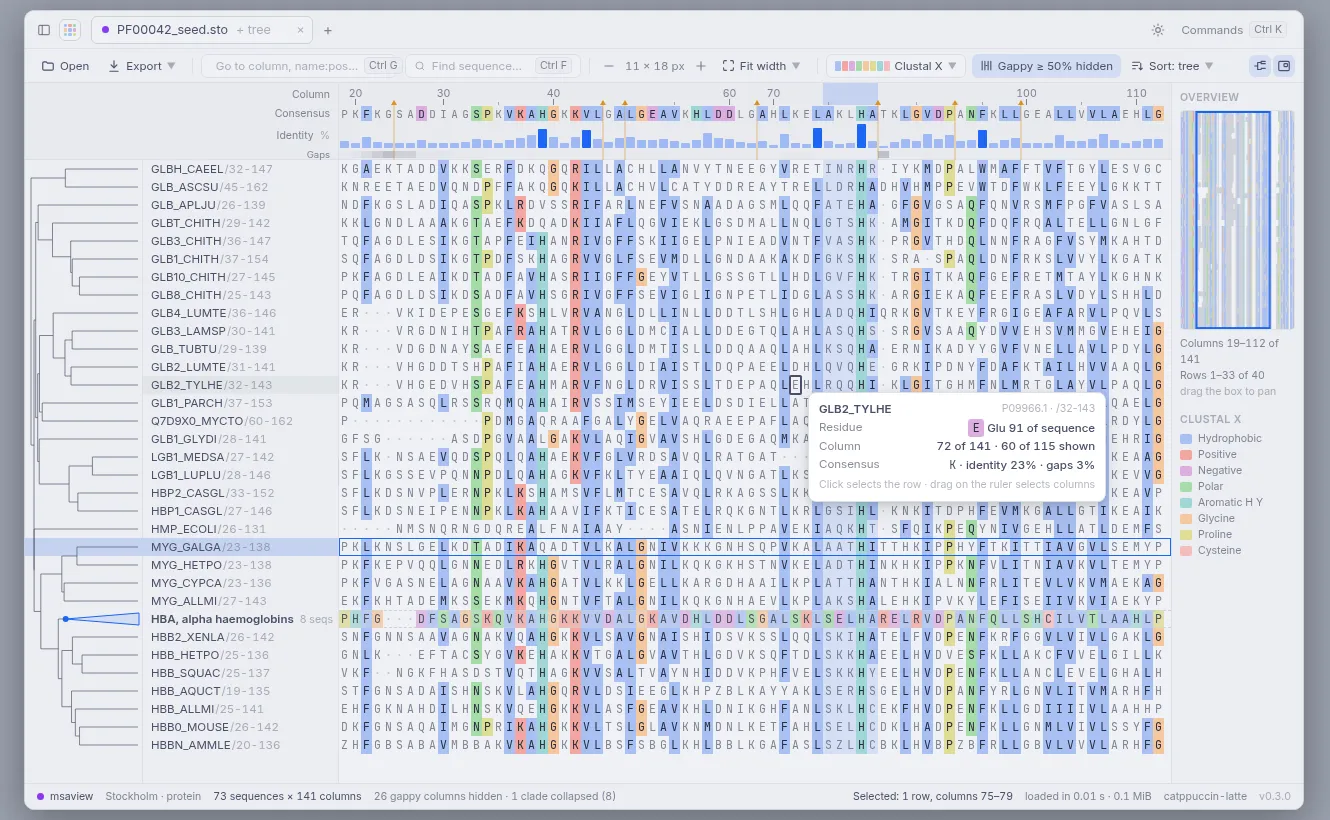
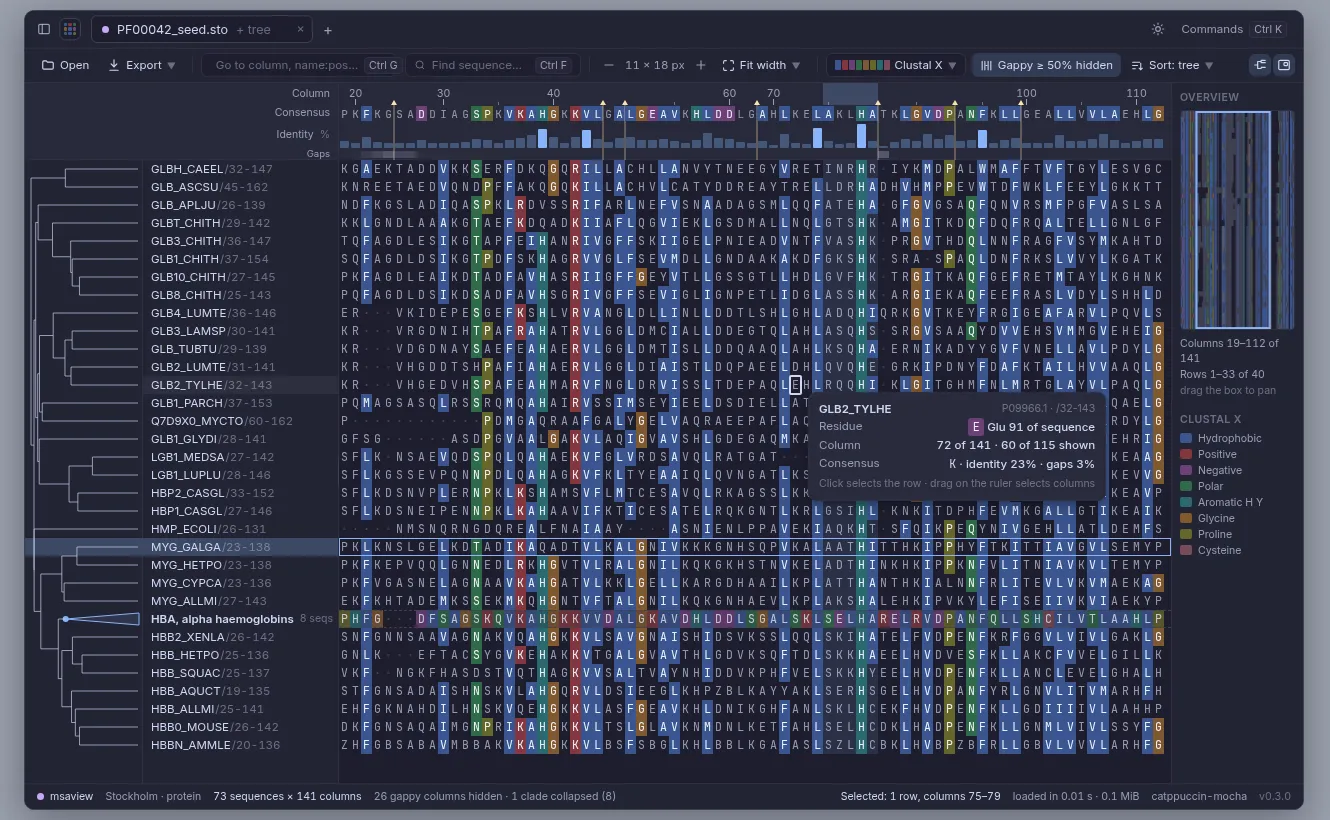
Section titled “Planned redesign”Phases 0–8 are built (see “Built so far” below), except the parts of phase 8 listed at the end. The pictures here are mockups, a static drawing of the planned main window at its default size (1280 × 800). It shows 40 of the 73 sequences of Pfam’s globin seed alignment (PF00042), ordered by a tree computed from those rows for the drawing only.
Built so far:
- Light and dark themes (Catppuccin Latte and Mocha, magenta accent) and System, which follows the OS appearance; a title bar with the file tab, a toolbar, and a status bar. One file at a time; tabs for several files are not built.
- A resizable sequence-name panel, and opening at a zoom where names and residues are readable. Fit, Fit width and Fit height, at the exact scale, replace the single fit-everything zoom.
- The design system behind them (colour tokens, sizes, fonts, shortcut labels), adapted from Kantor by the same author.
- Colour schemes (Clustal X with its column rules, percent identity, hydrophobicity, nucleotide, differences, by conservation) in both themes, and density rendering at low zoom.
- The overview panel (planned for later; it reuses the tile renderer, so it came early).
- The hover card with the residue’s position in the ungapped sequence.
- Hiding insert and gappy columns, with the ruler keeping the original numbers.
- Selecting rows, columns and blocks; copy and FASTA export; drag-and-drop; the cell cursor.
- The Newick tree panel: rows in tree order, collapsible clades shown as their consensus.
- Loading progress with Cancel (phase 7; the overview from phase 7 came earlier).
- PNG and SVG export of the view or the selection; sorting and filtering rows; go to
name:position; motif search; the tree’s right-click menu (with ladderize and reroot); recent files (phase 8). - Stockholm
#=GCand#=GRannotation tracks, and a reference row for the ruler, Differences and the identity track, pinned under the tracks (phase 8).
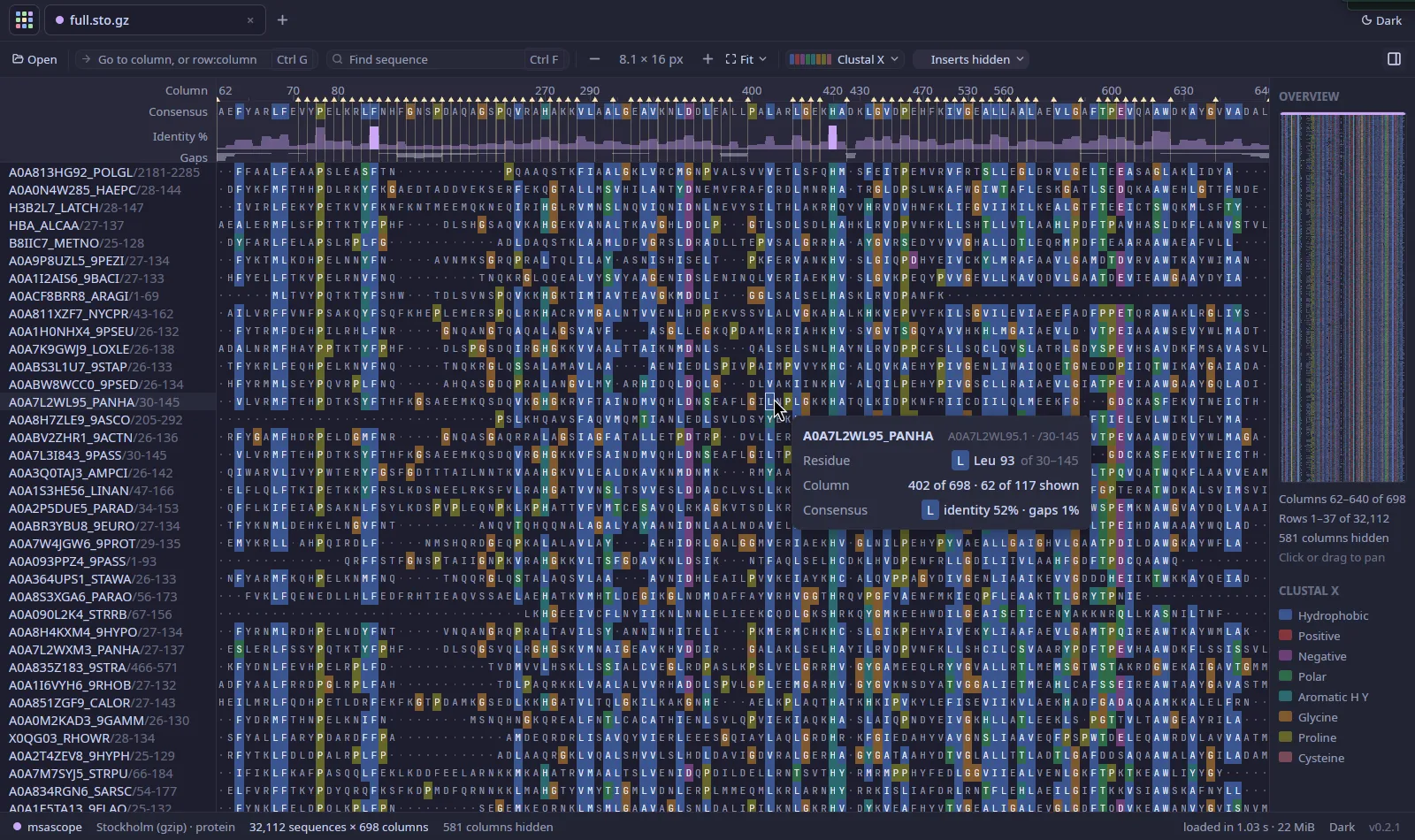
The current app with Pfam’s PF00042 full alignment (32,112 × 698; 581 insert columns hidden, 117 shown), dark theme at the zoom it opens at, with the hover card:
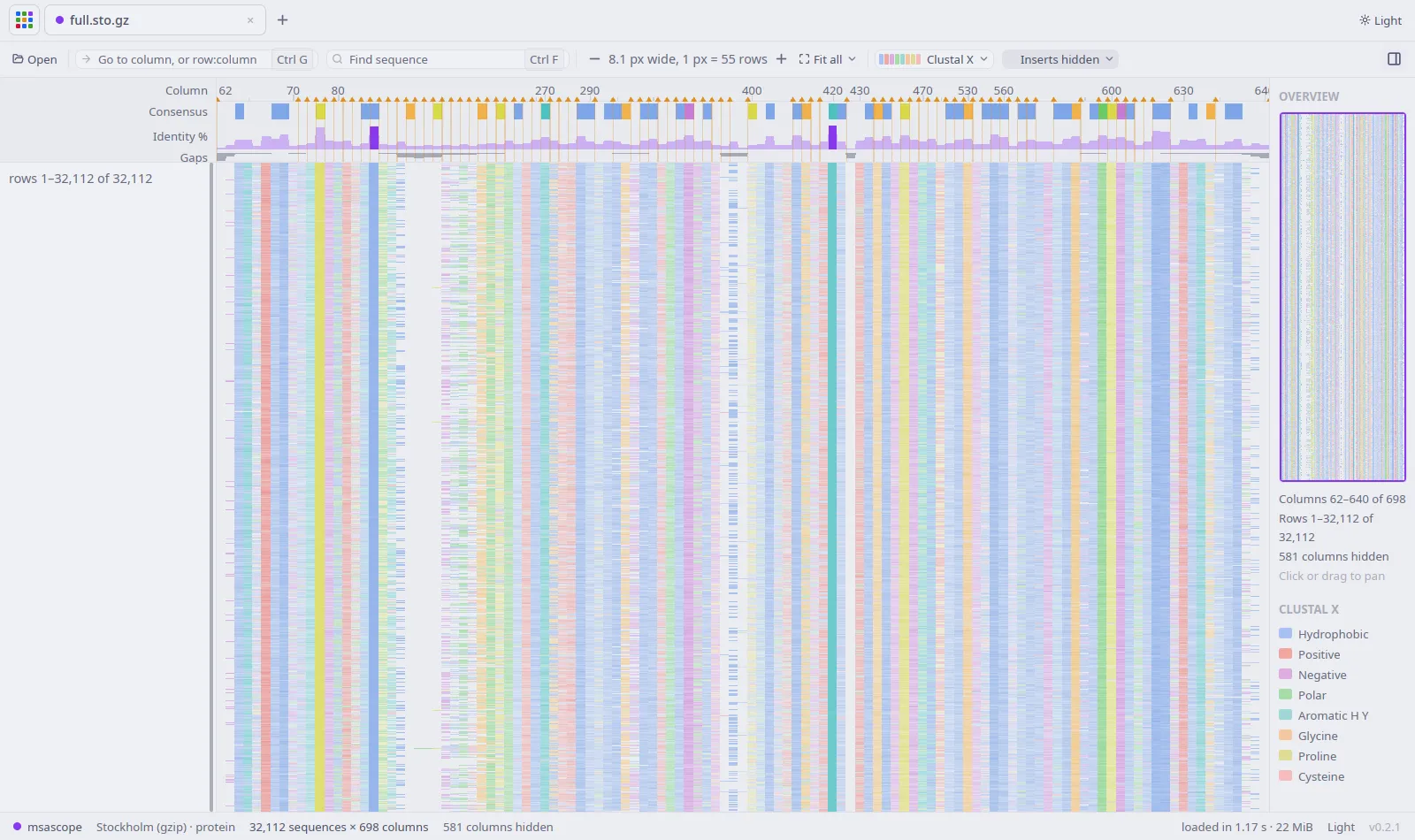
The same alignment in the light theme, fitted to the window (Fit all): each pixel row covers 55 sequences, and conserved columns show as strong stripes:
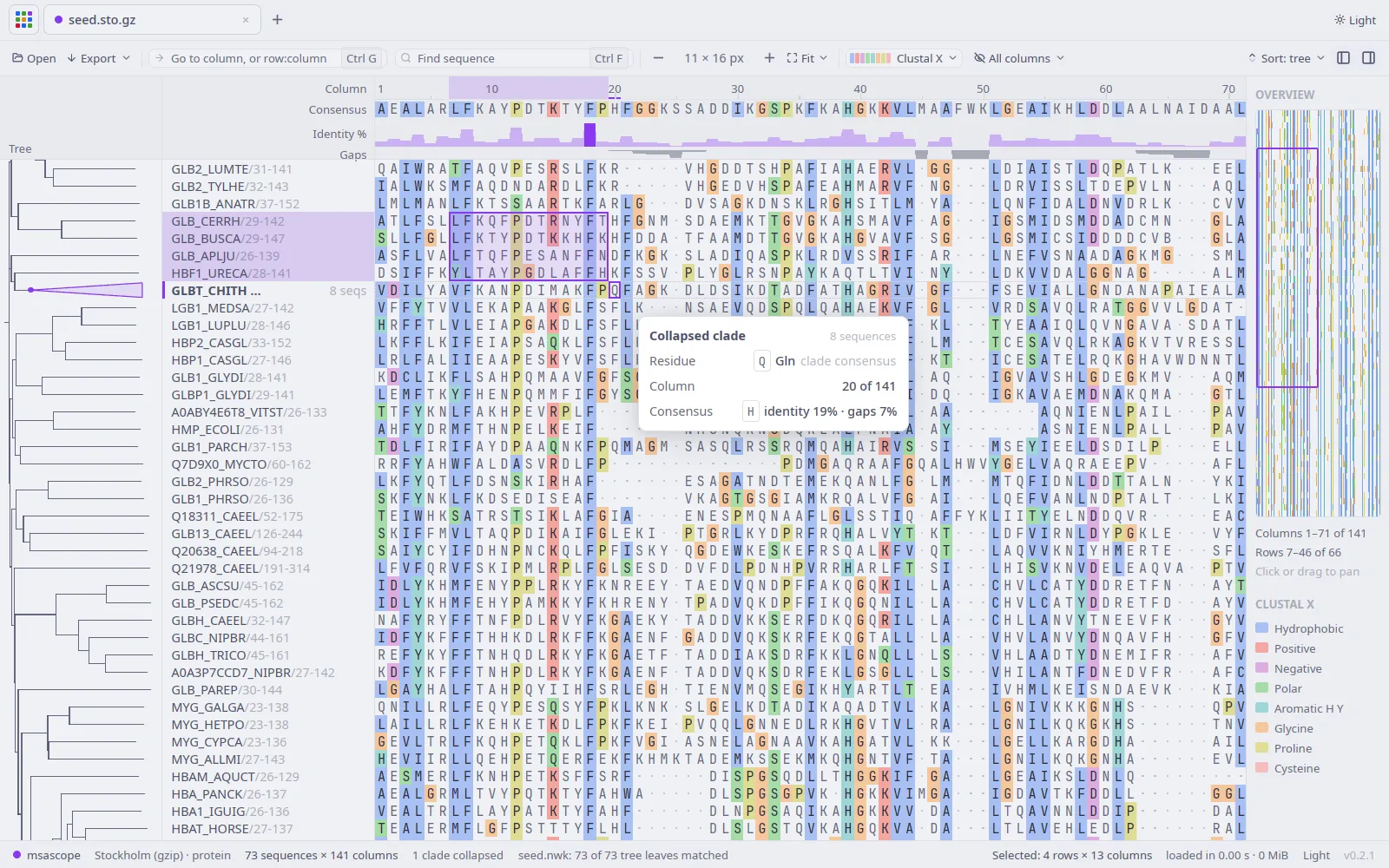
Pfam’s PF00042 seed (73 × 141) with an illustrative neighbour-joining tree built from pairwise identity for this picture (Pfam’s API has no tree for this family), one clade collapsed (8 sequences shown as their consensus), a block selected, and the cursor with its hover card:
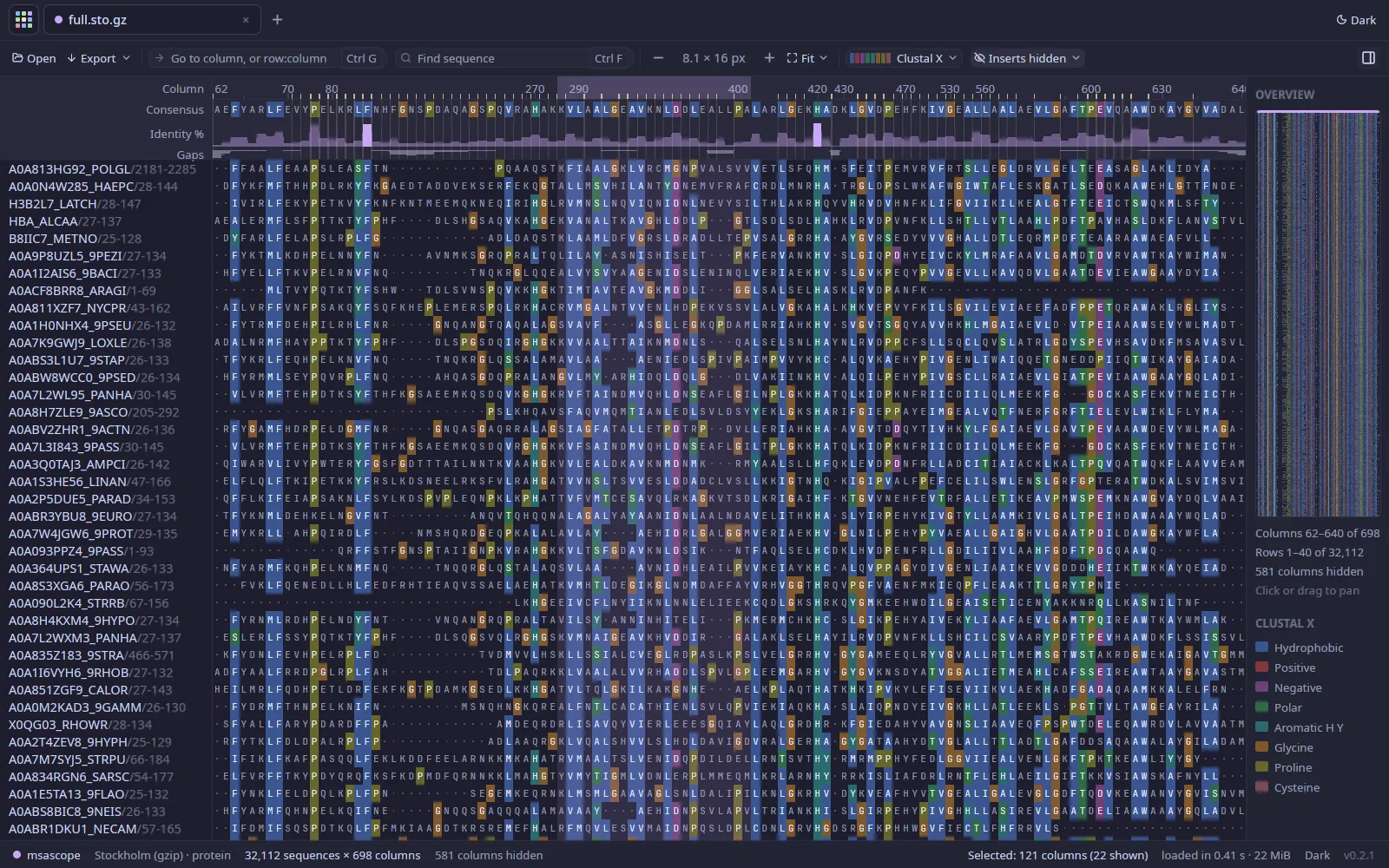
PF00042 full, dark theme, inserts hidden, with a range of columns selected by dragging on the ruler (121 columns of the alignment, 22 of them shown):
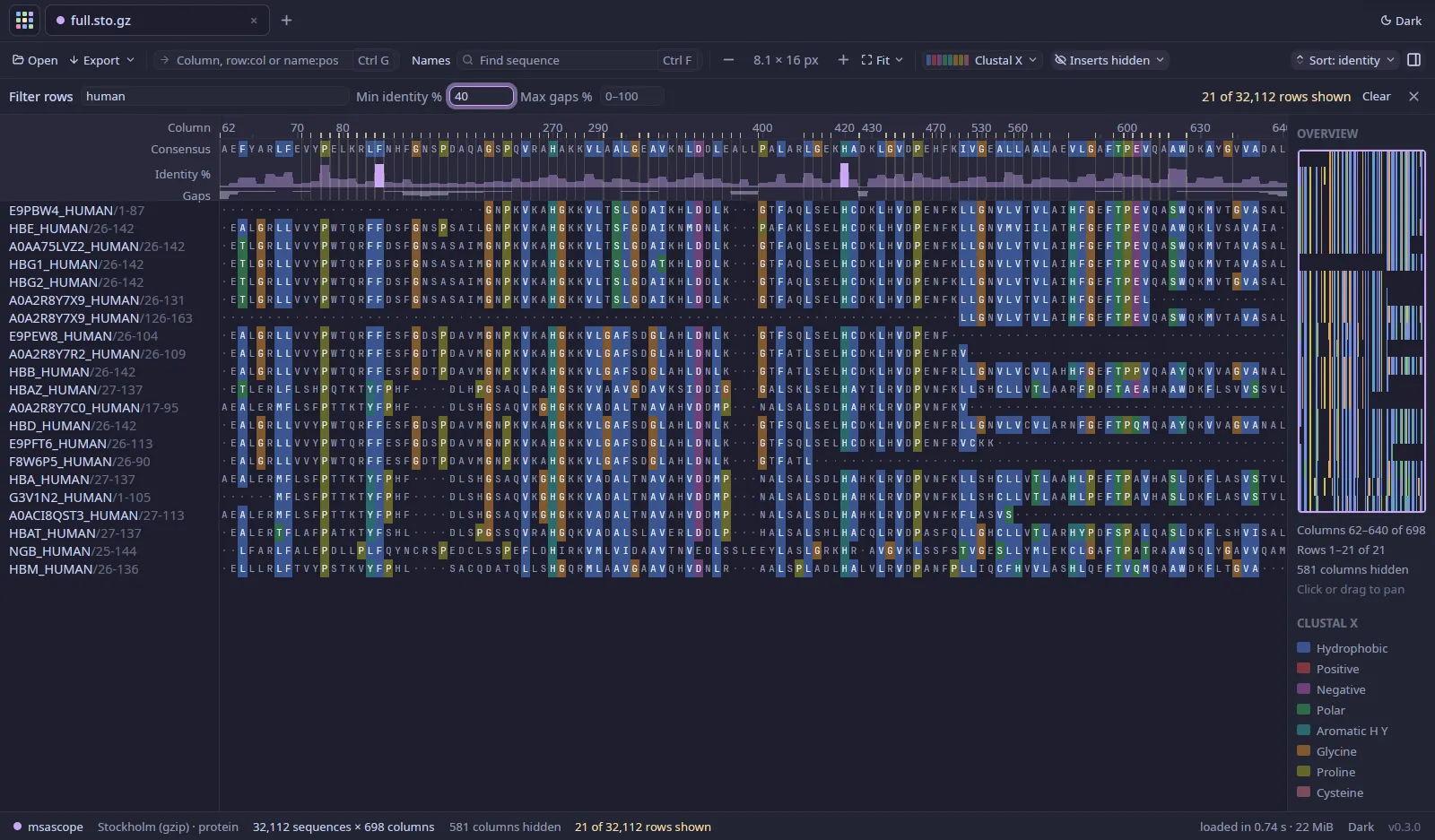
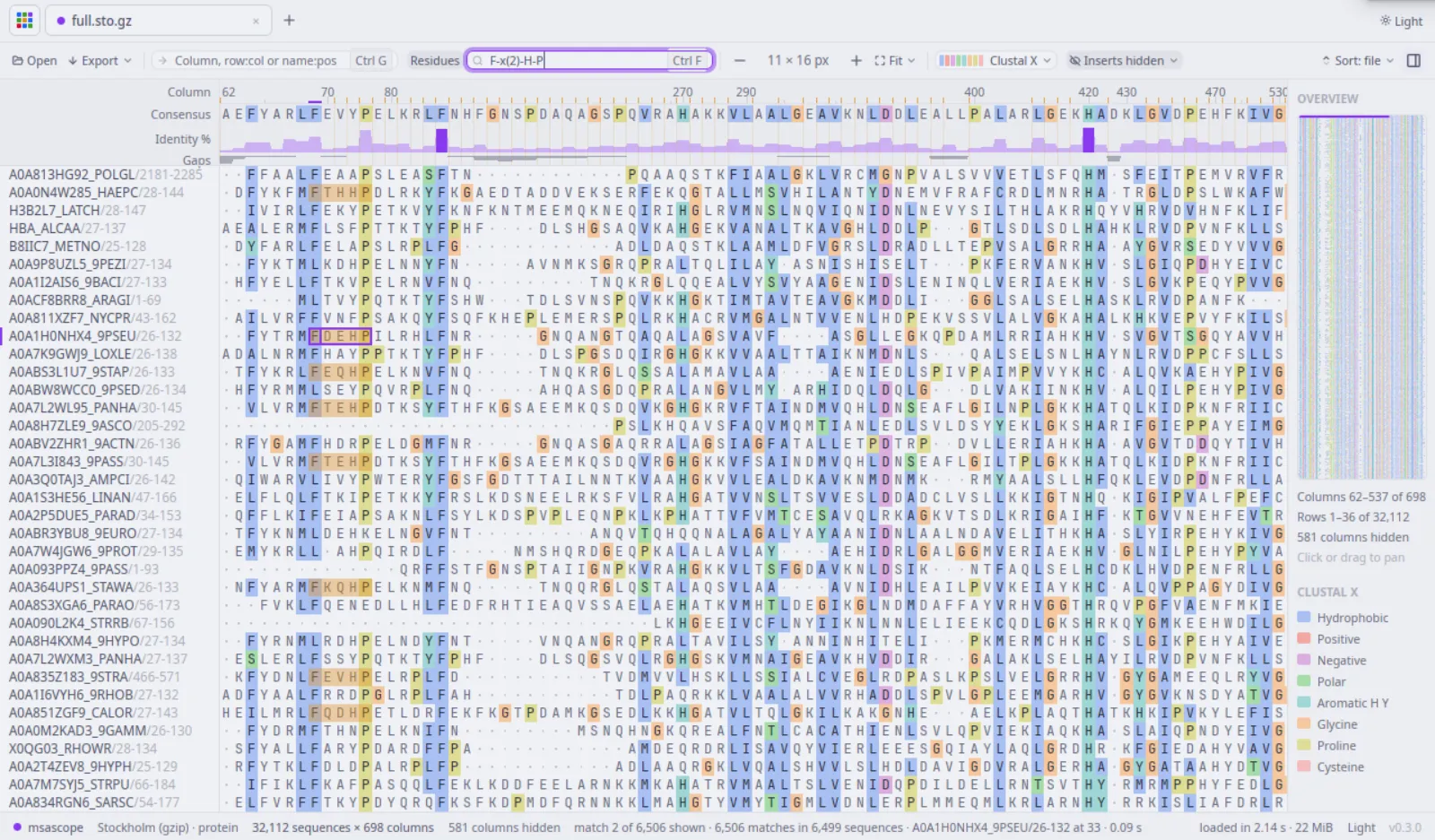
Pictures of phases 7 and 8 (PF00042; the loading window with a synthetic 100,000 × 30,000 file,
because PF00042 full loads in under half a second): the rows filtered to names containing
“human” with at least 40% identity to the consensus, then sorted by identity (21 of 32,112 rows),
and a motif search (F-x(2)-H-P, 6,506 matches):
Still to come from phase 8:
- Figures have no tree.
Each step has to keep the load and paint times in Measured within 5% and 1 ms.
Known gaps
Section titled “Known gaps”- Single machine tested (Linux, Wayland). The macOS and Windows builds are only checked to start
(
--help) on GitHub’s runners. - Mouse wheel, drag and the Open… dialog were not exercised by an automated test; zoom keys, colour mode, go-to and search were (driven through the keyboard while taking screenshots).
- The whole alignment must fit in RAM: about half a byte per nucleotide cell, so 10^6 × 30 kb needs about 15 GB. A memory-mapped packed cache file would lift that.
- Gzip input that isn’t BGZF is decompressed on one thread (alongside the parsing), and loads
about 2× slower than plain FASTA (3× before the zlib-rs backend); BGZF (
bgzip) files are decompressed in parallel. - While a file loads, the window shows its progress instead of the file that was open (which comes back if the load is cancelled); one file is open at a time.
- Upper pyramid levels approximate the majority (area-weighted majority of majorities).
- Clustal and Stockholm load on one thread and read the file twice; fine for typical sizes, slower than FASTA for very large files.
- No editing, and no computing a tree (bring a Newick file). Sorting by similarity uses identity to the consensus or to one reference row, not clustering.
- Motif search ignores lower-case (insert) state: residues are searched in upper case.
- Drag-and-drop was not exercised by an automated test. Selection, copy (read back from the clipboard), the cursor keys, collapsing clades, the tree menu, sorting, filtering, motif search, cancelling a load and the Export save dialog (PNG and SVG written) were, driven with a virtual mouse and keyboard while taking screenshots.
- Collapsing a clade or switching the order rebuilds the row order, clade consensus and pyramid for every row in the background (0.08–0.16 s at 230,000 × 300 on the test laptop; longer for wide alignments, not measured); the old layout stays on screen meanwhile.
- Lower-case residues (often used for unaligned or masked regions) are shown as upper case; only whole insert columns are kept, not which single residues were lower case.
- The density view samples at most 32 pyramid blocks or cells per pixel, so it is an estimate when a pixel covers more than that.